Zoho has no Mac App Store app. Its Mac option is Zoho Mail Desktop Lite, a free download that puts Zoho’s webmail in a window. To use Zoho in Apple Mail or any other Mac mail app you need IMAP, the right server for your Zoho data centre, and a paid plan if your account is new. This guide has all three.
I use a Zoho inbox next to several Gmails, and I make Roost, a Mac mail app that connects to Zoho. The server names below come from Zoho’s help pages. Where Zoho doesn’t publish them, I checked each server myself on 4 November 2026, and I say which is which.
The short version
- Zoho Mail Desktop Lite is Electron-based webmail in a window: no offline mailbox, Zoho accounts only (up to 10).
- New accounts on Zoho’s Free plan get no IMAP or POP, so no other mail app can connect. Paid plans start at $1 per user a month in the US, billed yearly.
- Turn on IMAP in Zoho Mail under Settings › Mail Accounts › your address › IMAP Access.
- Personal and free accounts use
imap.zoho.com; paid custom-domain accounts useimappro.zoho.com. Outside the US, the domain changes with your data centre. Canada iszohocloud.ca, not zoho.ca. - With two-factor sign-in on, a mail app needs an app-specific password, not your Zoho password.
Zoho’s own Mac apps
Zoho Mail Desktop Lite
Download it from zoho.com/mail/desktop, which offers separate buttons for Apple silicon (“Mac ARM”) and Intel Macs. It comes as a .pkg installer of about 120–130 MB and needs macOS 12 or later. The builds on Zoho’s download server were updated on 30 October 2026.
Know what you’re getting. Zoho staff have described it as “an Electron-based application” and “an exact replica of the webmail version,” and said it has no offline support. You can add up to 10 Zoho accounts; Zoho’s help doesn’t mention adding Gmail, iCloud or any other provider. Its View menu even has Reload App and Developer Tools, the giveaway of a wrapped web page. Zoho’s help also notes a font bug in previews on macOS Sequoia and Tahoe, fixed by restoring standard fonts in Font Book.
If Zoho is your only inbox and you’re online all day, Desktop Lite is fine and free. If you want offline mail or other accounts in the same window, you need IMAP.
Trident
Zoho also made Trident, a paid beta app that bundled mail, calendar, chat and tasks, with an offline mode. In November 2026 its download page redirects to Zoho’s general apps page, which no longer mentions it. It may be retired; Zoho hasn’t said.
The Mac App Store
There’s no Zoho Mail app for Mac in the App Store. Zoho has Cliq, Sheet, Notebook and others there, but mail isn’t one of them.
The Free plan catch: no IMAP for new accounts
Zoho’s IMAP help page says it directly: “For newly signed-up users (Free plan), the IMAP Access feature will not be available.” The pricing page lists the Free plan as “IMAP/ POP/ Active Sync not included.” Older snapshots of the help page show the restriction covered only POP until mid-2023, when it changed to IMAP. Zoho didn’t announce it anywhere I could find, which is why its community has threads titled things like “No more IMAP/POP/SMTP on free plans.”
Free accounts made before the change may still have IMAP. Zoho’s wording, “newly signed-up,” suggests so, but it doesn’t say it outright. If the IMAP Access box is missing or says “Available exclusively with paid plans,” that’s the plan, not a setting you missed.
US prices on Zoho’s pricing page on 4 November 2026, per user per month, billed yearly:
| Plan | Price | Storage per user |
|---|---|---|
| Mail Lite | $1 | 5 GB |
| Mail Lite | $1.25 | 10 GB |
| Mail Premium | $4 | 50 GB |
| Workplace Standard | $3 | 30 GB |
| Workplace Professional | $6 | 100 GB |
Prices differ by country. Zoho’s help gives paid organisation accounts their own IMAP servers, which implies IMAP on every paid plan, but the pricing page doesn’t list it plan by plan. Check before you buy if IMAP is the reason.
Turn on IMAP in Zoho Mail
- Sign in to Zoho Mail on the web and open Settings.
- Go to Mail Accounts and click your primary address.
- Under IMAP, tick IMAP Access and save.
On the same screen, “Launch folder settings” chooses which folders mail apps can see. Zoho: “Only the folders selected here will be available in the IMAP clients.” If a folder is missing in your Mac app, look here first. In a company account, if the IMAP option isn’t there at all, your administrator has turned it off.
IMAP and SMTP settings for every data centre
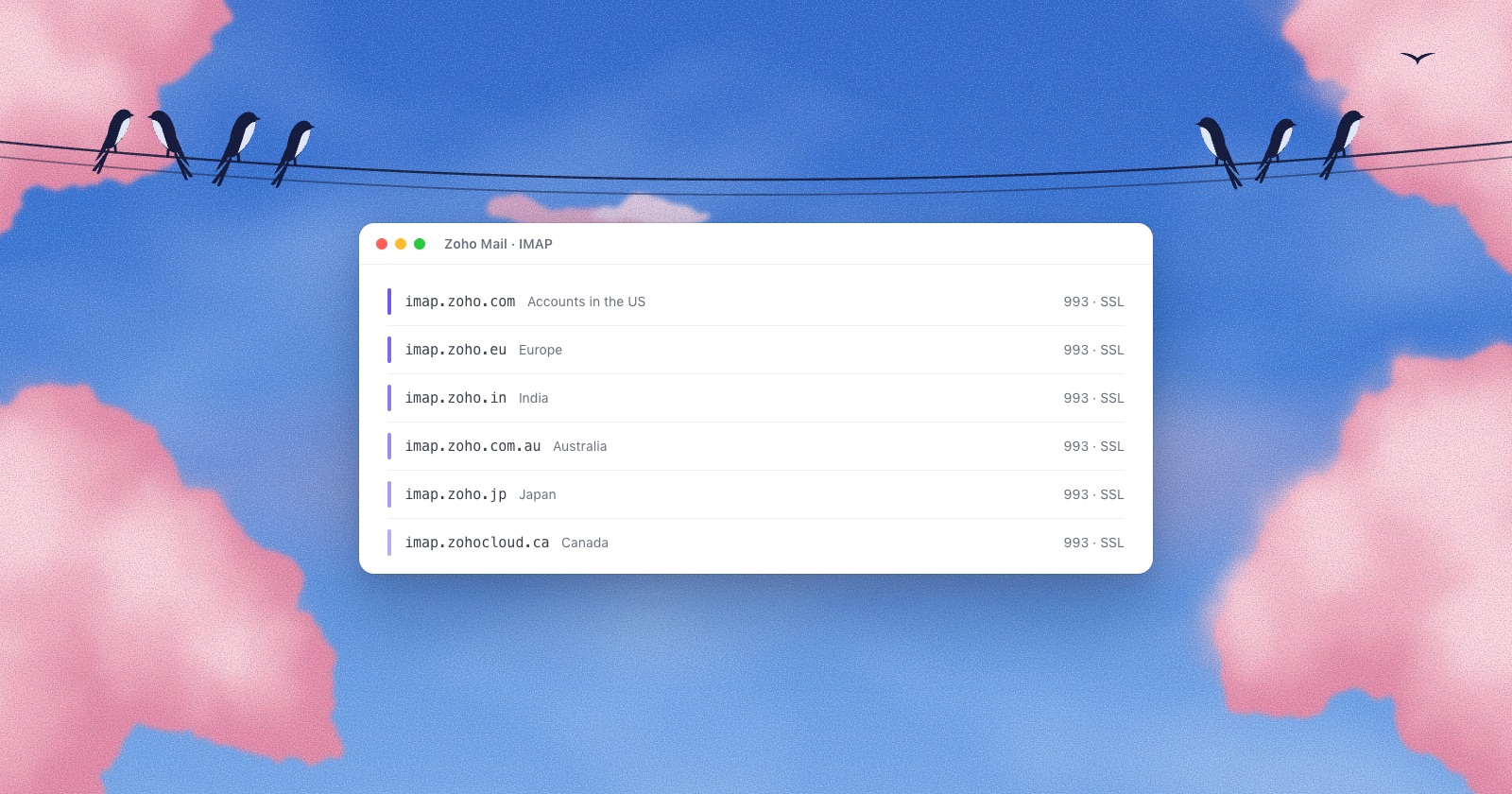
Zoho keeps each account in one data centre, and the servers follow it. Your webmail address tells you which: mail.zoho.eu means the EU, mail.zoho.in India, and so on.
Two rules apply everywhere. Personal accounts (@zohomail.com) and free organisation accounts use the plain servers; paid organisation accounts with your own domain use the “pro” servers. And the username is always your full email address.
| Data centre | IMAP (993, SSL) | SMTP (465 SSL or 587 TLS) |
|---|---|---|
| United States | imap.zoho.comimappro.zoho.com | smtp.zoho.comsmtppro.zoho.com |
| Europe | imap.zoho.euimappro.zoho.eu | smtp.zoho.eusmtppro.zoho.eu |
| India | imap.zoho.inimappro.zoho.in | smtp.zoho.insmtppro.zoho.in |
| Australia | imap.zoho.com.auimappro.zoho.com.au | smtp.zoho.com.ausmtppro.zoho.com.au |
| Japan | imap.zoho.jpimappro.zoho.jp | smtp.zoho.jpsmtppro.zoho.jp |
| Canada | imap.zohocloud.caimappro.zohocloud.ca | smtp.zohocloud.casmtppro.zohocloud.ca |
| Saudi Arabia | imap.zoho.saimappro.zoho.sa | smtp.zoho.sasmtppro.zoho.sa |
| China | imap.zoho.com.cnimappro.zoho.com.cn | smtp.zoho.com.cnsmtppro.zoho.com.cn |
Zoho’s help documents only the US servers and tells everyone else to look under “Server Configurations Details” inside their own account, so check there. The rows outside the US are servers I connected to on 4 November 2026: each one answered with Zoho’s certificate and greeting. The first line in each cell is the plain server, the second the “pro” one.
imap.zoho.ca exists, but it isn’t Zoho’s: it answers with a Bluehost certificate. Zoho’s Canadian data centre is zohocloud.ca.Zoho warns that using servers other than your account’s own can make “the client … stop working,” so a setup that worked for months can break if you guessed the server. Fix the host, not the password.
App-specific passwords
If two-factor sign-in is on, a mail app can’t use your Zoho password. Make one just for the app:
- Sign in at your region’s accounts site:
accounts.zoho.com, oraccounts.zoho.eu,accounts.zoho.in,accounts.zohocloud.caand so on. - Open Security › App Passwords.
- Click Generate New Password, give it a name like “Mac Mail,” and click Generate.
- Copy it straight into your mail app. Zoho shows it only once.
Zoho recommends app passwords for mail apps even without two-factor. If you sign in to Zoho with Google or Facebook, you first need to set a Zoho password: Zoho says you can’t use an outside sign-in for IMAP.
Zoho in Apple Mail
- In Mail, choose Mail › Add Account, then Other Mail Account.
- Enter your name, full Zoho address and password (or app password), and click Sign In.
- When Mail asks for servers, choose IMAP, and enter the incoming and outgoing servers from the table above.
Then fix the one thing that catches most Zoho users: Sent mail appearing twice. Zoho’s SMTP server files a copy of each letter in Sent by itself, and Apple Mail uploads one too. In Zoho Mail on the web, go to Settings › Mail Accounts › your address › SMTP and untick “Save copy of sent emails,” or tell Mail not to keep sent copies on the server. Use one or the other, not both.
Zoho’s own Apple Mail guide still refers to “Preferences,” which has been Settings since macOS Ventura, and its community has long threads about Sent being out of date and new mail arriving only after Mail restarts.
When it won’t connect
| What you see | Usual cause |
|---|---|
| IMAP is disabled, or the IMAP Access box is missing | A new Free plan account, or an administrator turned IMAP off |
| Authentication failed, or “unable to verify account name or password” | Two-factor is on and you used your normal password; the username isn’t the full address; or the server is wrong for your plan or data centre |
| Can’t reach the outgoing server | The app tried port 25. Use 465 (SSL) or 587 (TLS) |
| Relaying disallowed | The From address doesn’t match the account you signed in with |
| Folders missing | They’re unticked in Zoho’s IMAP folder settings |
Zoho in Roost
Roost has a Zoho tile in setup. It works out your data centre from your address’s mail servers (Europe, India, Australia, Japan, Canada and Saudi Arabia as well as the US), so you don’t pick servers from a table. You still need IMAP turned on and an app-specific password; Roost’s setup shows where to make one. Your Zoho inbox then sits in one list with your Gmail, iCloud and other inboxes, and replies to Zoho mail go out through Zoho from your Zoho address. Mail and passwords stay on your Mac.

Questions
Does Zoho Mail have a Mac app?
Yes and no. Zoho Mail Desktop Lite is a free download for Mac from zoho.com. It is Zoho’s webmail in a window, built on Electron, with no offline mailbox and no non-Zoho accounts. There is no Zoho Mail app in the Mac App Store.
Is IMAP free on Zoho Mail?
Not for new accounts. Zoho’s help says new Free plan users don’t get IMAP Access, and the pricing page says IMAP, POP and ActiveSync aren’t included in the Free plan. Paid plans start at $1 per user a month in the US, billed yearly.
Should I use imap.zoho.com or imappro.zoho.com?
Personal @zohomail.com accounts and free organisation accounts use imap.zoho.com. Paid organisation accounts with your own domain use imappro.zoho.com. Outside the US, replace zoho.com with your data centre’s domain.
What are Zoho’s IMAP settings for Europe?
imap.zoho.eu (or imappro.zoho.eu for paid organisations), port 993 with SSL. Outgoing is smtp.zoho.eu or smtppro.zoho.eu, port 465 with SSL or 587 with TLS. The username is your full address.
Why does every sent email show up twice in my Sent folder?
Zoho’s SMTP server saves a copy in Sent, and your mail app saves another. Untick “Save copy of sent emails” in Zoho’s SMTP settings, or turn off saving sent mail on the server in your app.
Sources
- Zoho, Zoho Mail Desktop Lite and download page; announcement and staff comments
- Zoho, IMAP Access and SMTP server configuration
- Zoho, Zoho Mail pricing
- Zoho, Two-factor authentication and app passwords
- Zoho, Configure Zoho Mail in Apple Mail
- Zoho Community, No more IMAP/POP/SMTP on free plans and duplicate messages in Sent