 Roost
FeaturesInbox
Turn off email notifications for one account on a Mac
Apple Mail picks one mailbox to notify you about, and its guide has no switch per account, so quieting one address takes a workaround. Roost has a checkbox per inbox.
Apple's Mail guide for macOS 27 (read on 19 November 2026) describes no switch to turn off notifications for just one email account. Mail has a setting that picks one mailbox to notify you about, Mail › Settings › General › "New message notifications", plus Focus filters, and System Settings, which turns Mail's notifications off for every account at once. Here is how to quiet one account with those, and how Roost does it with a checkbox per inbox.
In short
- "New message notifications" in Mail's General settings chooses which mailbox notifies you. The Dock number has its own setting, "Unread count".
- A Focus filter can show only some accounts in Mail while a Focus is on, and then only those notify.
- Mute stops notifications for one conversation, not one account.
- In Roost, untick Settings › an inbox › Notifications › New mail. That inbox's mail still arrives and lists, with no banner, sound, notch or Dock count. Sign-in codes still show.
What Apple Mail offers
One mailbox for notifications
Apple: "You have the option to receive these notifications from only certain mailboxes."
- In Mail, choose Mail › Settings, then click General.
- Click the "New message notifications" pop-up menu and choose a mailbox.
To quiet one account, pick a mailbox that leaves it out. Apple's guide doesn't list which mailboxes the menu offers, so open it and see. "Unread count" in the same pane chooses what the Dock badge counts.
A Focus filter
Apple: "You can add a Focus filter to specify which email accounts are visible in Mail when a Focus is on. You only receive notifications and see badge counts for the email accounts you choose to use during a particular Focus." It's the closest thing to a per-account switch, but only while that Focus is on, and it hides the other accounts too.
Everything off, or one conversation
System Settings › Notifications › Mail › Allow Notifications turns off every Mail notification, for all accounts. At the other end, Mute (select a conversation, then Message › Mute) silences one thread: "The conversation stays in your Inbox, but you aren't alerted by a notification or sound when new messages in the conversation arrive."
In Roost: a quiet inbox
Open Settings (⌘,), click the inbox, and untick Notifications › New mail; the note beside it changes from "Banners, the notch, the Dock" to "Arrives quietly". Or right-click the inbox in the sidebar and choose Turn Off Notifications.

A quiet inbox still syncs, and its letters still show in All inboxes. Its new mail brings no banner, sound or notch island, and doesn't count in the Dock number or the All inboxes number. Its own number in the sidebar stays, a little fainter, beside a crossed-out bell.
One thing it keeps: sign-in codes. A code only arrives because you just asked a site for one, so a code sent to a quiet inbox still shows, with a Copy Code button. Roost only takes a code from mail under 15 minutes old with a code word near the number, and skips years, prices, order and phone numbers.
A buyer asked for this: a throwaway sign-up address with thousands of unread letters made the Dock number useless.
The notch
On a MacBook with a notch (or at the top of any other screen), Roost's notifications can come out of the notch as a small black island instead of a banner. Settings › Notch turns each kind on or off:
| Island | What it shows |
|---|---|
| New mail | Who wrote, the subject and the inbox in its colour. Hover for Reply or Mark as Read; a click opens the letter. Only while Roost is behind other apps. |
| Sign-in codes | The code, who sent it, and a copy button that copies without bringing Roost forward. |
| Sending | A paper plane with Undo for the 5 seconds a sent letter waits. |
| Reply later | A clock when a conversation you put away comes back. |
| Drop files | Drag files to the top centre of the screen to start a new message with them. |
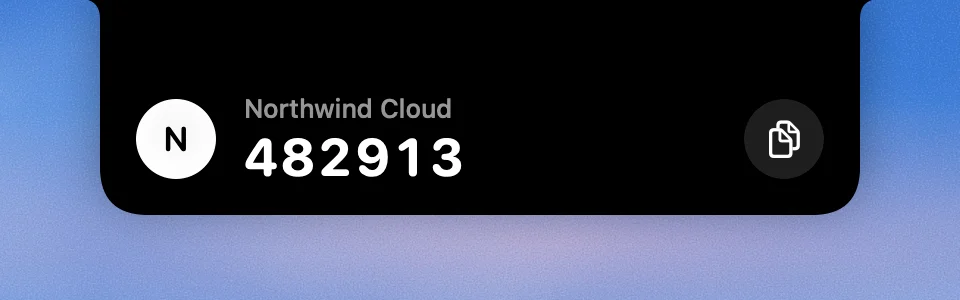
Settings › Notch also picks which inboxes may use the island, how long it stays (5 to 30 seconds), and "Quiet over full-screen apps", which sends codes and mail to ordinary banners while you present. New mail shown on the island also stays in Notification Center.
Questions
How do I turn off Mail notifications for one account on a Mac?
Apple's guide describes no per-account switch. Choose a mailbox under Mail › Settings › General › "New message notifications" that leaves the account out, or use a Focus filter that hides it. In Roost, untick that inbox's Notifications › New mail.
How do I stop all email notifications on a Mac?
System Settings › Notifications, click Mail, then turn Allow Notifications off. For Roost, do the same with Roost, or untick Settings › General › "Notify me about new mail".
Why did I get a sign-in code from a quiet inbox?
On purpose. A code comes only when you asked a site for one, and a code you can't see is no use, so codes still show from quiet inboxes.
Sources
- Apple, Mail User Guide for macOS 27, "Manage notifications from Mail on Mac" (new message notifications, Focus filters, Mute): support.apple.com/guide/mail/manage-notifications-mlhlc8ab2bf1/mac, read 19 November 2026.
- Apple, "Change General settings in Mail on Mac" (Unread count, New message notifications): support.apple.com/guide/mail/change-general-settings-cpmlprefgen/16.0/mac/27, read 19 November 2026.
- Roost changelog: roostmail.app/changelog.