 Roost
FeaturesWriting
Undo send in Mail on a Mac
Apple Mail holds a sent email for 10 seconds by default so you can take it back. Here is where that delay lives and how undo works in Roost.
To undo send in Mail on a Mac, click Undo Send at the bottom of the sidebar within 10 seconds of sending, or choose Edit › Undo (⌘Z). The email comes back as a draft. To get more time, or to turn it off, go to Mail › Settings › Composing and change the "Undo send delay" pop-up menu. That's Apple's Mail guide for macOS 27, read on 19 November 2026. Below: the details, and undo in Roost, which covers archive and delete too.
In short
- Apple Mail holds a sent email for 10 seconds by default. Undo Send sits at the bottom of the sidebar, and ⌘Z does the same.
- The delay is in Mail › Settings › Composing › "Undo send delay". Apple's guide for macOS 27 doesn't list the choices on that menu.
- Apple's macOS 15 guide adds that Undo Send isn't available for mail with large attachments sent using Mail Drop.
- Roost waits 5 seconds after every send, archive, delete and move. ⌘Z or the toast's Undo takes it back, and a sent letter reopens in its window.
Undo Send in Apple Mail
Within 10 seconds of sending, click Undo Send at the bottom of the Mail sidebar, or choose Edit › Undo. Apple's shortcut list names Command-Z as "Unsend email". Apple calls the setting a delay: Mail waits before it sends, and Undo Send cancels the wait. Nothing gets pulled back out of anyone's inbox, so once the delay is over the email is theirs.
Change the undo send delay
From Apple's Composing settings page: "By default, you have ten seconds to change your mind after you send an email to use Undo Send. To give yourself more time to change your mind and unsend an email, or to turn this feature off, click the 'Undo send delay' pop-up menu, then choose an option."
- Choose Mail › Settings.
- Click Composing.
- Open the "Undo send delay" pop-up menu and choose a longer delay, or the option that turns it off.
I can't give you the exact values from Apple: neither the macOS 27 guide nor the macOS 15 one lists them, and other sites' lists of 10, 20 and 30 seconds aren't Apple's word. Open the menu on your own Mac to see them.
One limit Apple names in its macOS 15 guide: "Undo Send is not available for messages with large attachments sent using Mail Drop." The macOS 27 guide no longer has that line, and doesn't say whether the limit is gone.
In Roost: 5 seconds for everything
Roost has one undo window, 5 seconds, and it covers more than sending. When you send, archive (E), delete (# or ⌫), mark as spam, move or mute, the change shows at once and a toast appears at the foot of the list: "Sending", "Archived", "Archived 12". For the next 5 seconds nothing has reached your mail server.
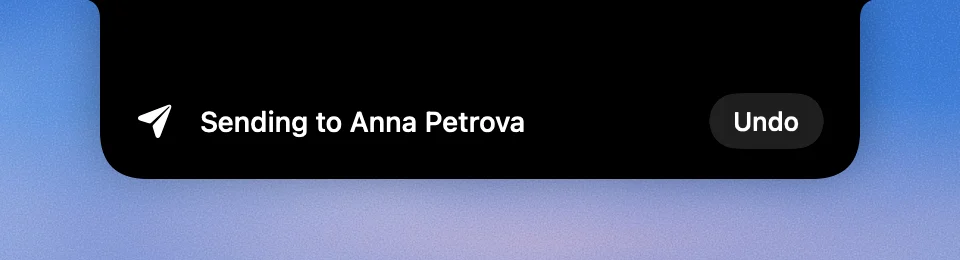
Take it back with any of these:
- ⌘Z, from anywhere in the main window.
- Undo on the toast.
- Undo on the paper plane in the notch, which takes back the message it shows.
An undone send reopens in its compose window with the words, recipients and files as they were. A reply typed in the box under a letter comes back in a window too. An undone archive or delete puts the conversation back in the list where it was.
After the 5 seconds, ⌘Z says "Already sent" (or "Too late to undo" for an archive), because by then the server has it. The 5 seconds are fixed; there's no setting to change them.
What else the wait buys
The same queue is why Roost works offline. A letter sent with no connection, or an archive done on a train, sits in the queue on your Mac and goes when the network comes back; the sidebar says "1 waiting to send" meanwhile. If you quit while something waits, Roost asks: Send and Quit, Quit (it sends next time you open Roost), or Cancel. A server that refuses the letter brings it back as a draft with the reason.
Send & Done (⌥⌘↩) sends a reply and archives the conversation in one go. One ⌘Z undoes both: the reply returns to its draft and the conversation to the inbox.
Questions
How do I undo send in Mail on a Mac?
Click Undo Send at the bottom of the sidebar within the delay (10 seconds by default), or choose Edit › Undo. The email comes back to edit.
Where is the undo send delay setting in Apple Mail?
Mail › Settings › Composing › "Undo send delay". Apple says you can pick more time there or turn the feature off.
Can I unsend an email after it's been delivered?
Not from Apple Mail or Roost. Both only hold the email on your Mac for a few seconds before handing it to your mail server. Once it's gone, it's in the other person's inbox.
Does Roost's undo work for archive and delete too?
Yes. Every archive, delete, spam, move and mute waits the same 5 seconds before Roost tells the server, so ⌘Z puts the conversation back before anything changes there.
Sources
- Apple, Mail User Guide for macOS 27, "Send email messages in Mail on Mac" (Unsend with Undo Send): support.apple.com/guide/mail/send-email-messages-mlhlp1098/mac, read 19 November 2026.
- Apple, "Change Composing settings in Mail on Mac" (Undo send delay): support.apple.com/guide/mail/change-composing-settings-cpmlprefcomp/16.0/mac/27, read 19 November 2026.
- Apple, "Keyboard shortcuts in Mail on Mac" (Unsend email, Command-Z): support.apple.com/guide/mail/keyboard-shortcuts-mlhlb94f262b/mac, read 19 November 2026.
- Apple, Mail User Guide for macOS Sequoia 15, "Unsend emails with Undo Send in Mail on Mac" (Mail Drop note): support.apple.com/guide/mail/unsend-emails-with-undo-send-mlhlbf24d020/16.0/mac/15, read 19 November 2026.
- Roost changelog: roostmail.app/changelog.